NEXUS Icon
Nexus
01 — NEXUS PLAYBOOKS

THE ULTIMATE CUSTOM OS PLAYBOOK.

Re-Creating Windows The Way It's Meant To Be. Rebuild your operating system with zero bloat, zero telemetry, and zero compromises - just pure performance that works for you.

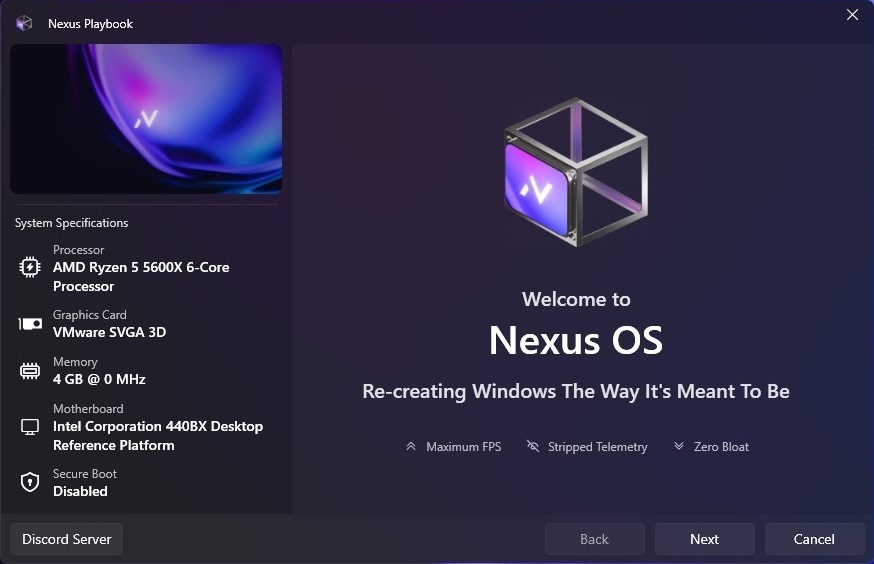
Nexus Playbook Configuration GUI
BLOATWARE REMOVED/ PRIVACY HARDENED/ SERVICES TRIMMED/ SCHEDULER TUNED/ DEFENDER CONFIGURED/ POWER PLAN APPLIED/ REGISTRY CONFIGURED/ SYSTEM OPTIMIZED/ BLOATWARE REMOVED/ PRIVACY HARDENED/ SERVICES TRIMMED/ SCHEDULER TUNED/ DEFENDER CONFIGURED/ POWER PLAN APPLIED/ REGISTRY CONFIGURED/ SYSTEM OPTIMIZED/ BLOATWARE REMOVED/ PRIVACY HARDENED/ SERVICES TRIMMED/ SCHEDULER TUNED/ DEFENDER CONFIGURED/ POWER PLAN APPLIED/ REGISTRY CONFIGURED/ SYSTEM OPTIMIZED/
02 - ARCHITECTURE COMPARISON

A NEW WAY TO
REBUILD WINDOWS.

Why settle for black-box operating system images or slow deployment scripts? Nexus utilizes a custom-built, proprietary executor to optimize your Windows setup safely and efficiently.

/ Traditional Method

TRADITIONAL CUSTOM ISOs

ISOs are pre-configured, black-box packages. They are entirely rigid, offering no customization during installation, and often lack essential drivers or components required for your specific workflow.

RIGID PRE-CONFIGURATIONS
/ Generic Scripts

STANDARD AME PLAYBOOKS

Other AME Wizard playbooks aren't fully configured to handle deep system component removals. They often leave unnecessary background packages intact and take an excessively long time to deploy.

UNOPTIMIZED & SLOW DEPLOYMENT
/ The Nexus Difference

NEXUS PLAYBOOK EXECUTOR

Our bespoke Playbook Executor goes deep into the OS Component Store to trim bloatware and telemetry. It operates significantly faster, maintains complete package awareness, and executes with maximum efficiency.

COMPONENT-LEVEL OPTIMIZATION
03 - PLAYBOOK VARIANTS

FOUR PACKAGES.
ONE BASE: PERFORMANCE.

Hover any card to reveal details and features. Select Superlite for full gaming compatibility or Ultralite for raw system throughput.

Nexus OS 10: Superlite
/ 01
WINDOWS 10
Superlite Build

Nexus OS 10: SUPERLITE

The balanced choice for Windows 10 users who want a noticeably faster system without sacrificing everyday usability.

WIN 10 20H2 & ABOVE HOVER →
/ OS 10: Superlite — Details

OS Details

Superlite removes bloatware, disables telemetry, strips unnecessary background services, and applies a comprehensive set of privacy and performance registry tweaks all while keeping the system fully functional for general use, gaming, and productivity.

Supported Winvers: Windows 10 20H2 and above
Defender Removal: Configurable by user
Windows Update: Supported (configurable by user)
AI Features: Copilot, Recall & AI removal (configurable by user)
Telemetry: Telemetry, data collection & activity tracking removed
Services: Scheduled tasks and unnecessary services removed
Settings: Privacy-hardened settings
Best For: Daily drivers, gaming rigs, and anyone coming from stock Windows wanting a clean, fast experience
Price
$20.00
Get License
Nexus OS 10: Ultralite
/ 02
WINDOWS 10
Ultralite Build

Nexus OS 10: ULTRALITE

The most stripped-down Windows 10 configuration we offer, targeting hardware-level overhead and deep OS components.

WIN 10 20H2 & ABOVE HOVER →
/ OS 10: Ultralite — Details

OS Details

The most stripped-down Windows 10 configuration we offer. Ultralite goes further than Superlite by targeting hardware-level overhead and deep OS components that Superlite leaves intact.

Supported Winvers: Windows 10 20H2 and above
Defender Removal: Configurable by user
Windows Update: Not supported
AI Features: Copilot, Recall & AI removal (configurable by user)
Telemetry: Telemetry, data collection & activity tracking removed
Services: Scheduled tasks and unnecessary services removed
Settings: Privacy-hardened settings
Cleanup: Deeper service and driver stack cleanup
Components: Further APPX and System Component removal
Footprint: Even lower idle resource usage than Superlite
Best For: Dedicated gaming PCs, low-spec hardware, and power users wanting maximum headroom

Price
$20.00
Get License
Nexus OS 11: Superlite
/ 03
WINDOWS 11
Superlite Build

Nexus OS 11: SUPERLITE

Everything Windows 10 Superlite delivers, rebuilt for Windows 11 with additional work to address Win 11 forced bloatware.

WIN 11 23H2 & ABOVE HOVER →
/ OS 11: Superlite — Details

OS Details

Everything Windows 10 Superlite delivers, rebuilt for Windows 11 with additional work to address the extra telemetry, UI overhead, and forced components Microsoft introduced in 11.

Supported Winvers: Windows 11 23H2 and above (Retail, Release Preview, Canary, Dev Build supported)
Defender Removal: Configurable by user
Windows Update: Supported (configurable by user)
AI Features: Copilot, Recall & AI removal (configurable by user)
Telemetry: Telemetry, data collection & activity tracking removed
Services: Scheduled tasks and unnecessary services removed
Settings: Privacy-hardened settings
Best For: Daily drivers, gaming rigs, and anyone coming from stock Windows wanting a clean, fast experience
Price
$20.00
Get License
Nexus OS 11: Ultralite
/ 04
WINDOWS 11
Ultralite Build

Nexus OS 11: ULTRALITE

Everything Windows 10 Ultralite delivers, rebuilt for Windows 11 to eliminate telemetry, forced services and Widgets.

WIN 11 23H2 & ABOVE HOVER →
/ OS 11: Ultralite — Details

OS Details

Everything Windows 10 Ultralite delivers, rebuilt for Windows 11 with additional work to address the extra telemetry, UI overhead, and forced components Microsoft introduced in 11.

Supported Winvers: Windows 11 23H2 and above (Retail, Release Preview, Canary, Dev Build supported)
Defender Removal: Configurable by user
Windows Update: Not supported
AI Features: Copilot, Recall & AI removal (configurable by user)
Telemetry: Telemetry, data collection & activity tracking removed
Services: Scheduled tasks and unnecessary services removed
Settings: Privacy-hardened settings
Cleanup: Deeper service and driver stack cleanup
Components: Further APPX and System Component removal
Footprint: Even lower idle resource usage than Superlite
Best For: Dedicated gaming PCs, low-spec hardware, and power users wanting maximum headroom
Price
$20.00
Get License
04 - VERIFIED BENCHMARKS

PROVEN FRAMETIMES.
PERFORMANCE TESTED.

Select your target game to see realistic framerate and input delay measurements.

AVERAGE FRAME RATE (FPS) HIGHER IS BETTER
Stock Windows 0 FPS
Nexus Playbook Rebuild 0 FPS
1% LOW FPS (STUTTER PREVENTION) HIGHER IS BETTER
Stock Windows 0 FPS
Nexus Playbook Rebuild 0 FPS
SYSTEM INPUT LATENCY (MS) LOWER IS BETTER
Stock Windows 0 ms
Nexus Playbook Rebuild 0 ms
BENCHMARK RIG SPECS
CPU: AMD Ryzen 7 5800X GPU: NVIDIA GeForce RTX 3080 Ti RAM: 32GB DDR4 Dual-Channel
05 - AUTOUNATTEND GENERATOR

WINDOWS UNATTENDED
XML CREATOR.

Automate your stock Windows deployment. Generate a configured answer file to skip setup screens, bypass online account force-throughs, and prevent Windows from overriding your optimized drivers on first boot.

// BUILT-IN AUTOMATIONS:
  • TPM, Secure Boot & RAM hardware bypass
  • Auto accepts Windows License Agreement (EULA)
  • Disables BitLocker automatic device encryption
  • Skips Windows OOBE setup screens
  • Bypasses Microsoft Online account requirement
  • Disables automatic driver downloads on first boot
PLACEMENT GUIDELINES

WHERE TO PLACE THE FILE

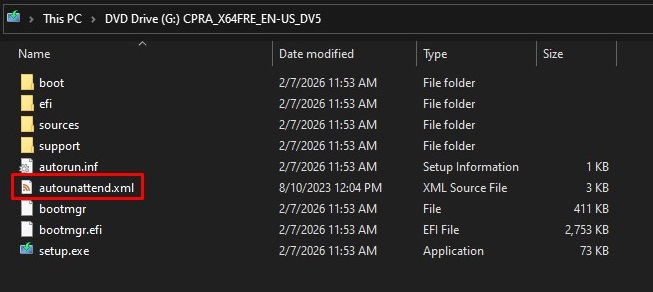
Once you generate your autounattend.xml file, copy it directly to the root folder of your USB installation drive (e.g. E:\autounattend.xml) after Rufus has completed burning the Windows ISO.

USB Drive Root Directory placement mockup
USB Drive Root Directory
06 - OS SETUP SERVICE

PROFESSIONAL
OS SETUP SERVICE.

Let our experts handle the installation. Get your playbook deployed, configured, and optimized with zero hassle.

INSTALLATION ASSISTANCE

WE INSTALL & CONFIGURE IT FOR YOU

Don't want to deal with USB flashing, BIOS parameters, and driver hunting? We got you! Our remote setup service takes care of the installation process so you can get right into the action.

// WHAT'S INCLUDED:
  • OS Installation: Full deployment of your playbook build
  • Dual Boot Setup: Side-by-side configuration (optional)
  • Data Backup: Carry over essential files to the new OS
  • App Config: Game launchers and custom programs setup
  • Optimal Drivers: Optimal graphics and chipset driver deployment
SETUP SERVICE
+$10
ADD-ON PROMOTION

Safe remote session · Discord coordination

07 - REBUILD ANSWERS

PLAYBOOK QUESTIONS.

Common queries regarding custom operating system installations, updates, and compatibility.

Nexus OS is for people who just want a fast, clean system without modifying or optimizing any settings themselves. You install it, add your drivers and apps, and you’re ready to game. It’s simple, reliable, pre-optimized and telemetry free, but it doesn’t include deeper tweaks like BIOS changes or GPU-level tuning.
Superlite is for casual users who just wants a clean and smooth experience without the hassle of troubleshooting anything and simply enjoying their games. Ultralite is meant for advanced users, it removes more components which results in less resource usage at the cost of compatibility (unsupported list mentioned in respective channels), hence it's more suitable for those who are willing to sacrifice some system functionality for better gaming experience.
On Superlite you can use the Configurator app to install the updates, plain and simple. On Ultralite you'd have to clean install in order to update it.
Yes. All competitive clients and their corresponding anti-cheat kernels work perfectly. This includes Vanguard (Valorant), Faceit AC (CS2), EAC (Fortnite/Apex), and BattlEye (R6 Siege). If you play games requiring the Microsoft Store or Xbox App services, make sure to choose the Superlite variant.
JOIN THE NEXUS DISCORD
FREE · EXPERTS ONLINE · GAMER'S COMMUNITY
JOIN DISCORD
Redirecting to Checkout
Initializing secure payment gateway...